Computing Tools for State-Space Analysis
For many nonlinear models, numerical solution of the state equation is required. For linear models, we can always solve them analytically using the methods of this chapter. However, due to its convenience, we will often want to use numerical techniques even when analytic ones are available. Furthermore, even for analytic solutions, we may want to use computational tools to perform the algebraic manipulations and to plot the results. In this section, we introduce some of these tools.
Python Tools
Python can be used to perform all computations of interest in this chapter, using NumPy for array math, SymPy for symbolic manipulation, and the Python Control Systems Library for state-space simulation.
The Python Control Systems Library Package
The Python Control Systems Library package provides state-space objects and time-response simulation (e.g., free and forced responses), enabling quick numerical comparison with analytic solutions for linear systems.
For workflow, the library makes it easy to go from matrices to a model object and then simulate with realistic inputs. Time responses, frequency responses, and system interconnections can be computed with a few lines, which is convenient when exploring design alternatives or validating assumptions. This complements symbolic work: analytic results explain why a response looks a certain way, while numerical tools show what the response actually is for specific parameter values.
Because plotting is integrated into the same workflow, results can be visualized immediately and compared against analytic expressions or experimental data. This supports rapid prototyping, model checking, and communication of results in a form that mirrors standard control-system practice.
Key functions we will use include:
control.ss(A, B, C, D)for creating state-space modelscontrol.initial_response(sys, T=None, X0=0.0)for free responsescontrol.forced_response(sys, T=None, U=0.0, X0=0.0)for forced responsescontrol.step_response(sys, T=None, X0=0.0)for step responses
Example 1: Numerical state-space simulation
This example uses only control
(and numpy for arrays) to compute a
numerical response. Consider a linear state model with the following
\(A\), \(B\), \(C\), and \(D\) matrices: $$\begin{align}
A &=\begin{bmatrix}
-3 & 4 & 5 \\
0 & -2 & 3 \\
0 & -6 & 1
\end{bmatrix}
\quad
B &=\begin{bmatrix}
1 \\ 0 \\ 1
\end{bmatrix}
\quad
C &=\begin{bmatrix}
1 & 0 & 0 \\
0 & -1 & 0
\end{bmatrix}
\quad
D &=\begin{bmatrix}
0 \\ 0
\end{bmatrix}.
\end{align}$$
Import required libraries
import numpy as np
import control
import matplotlib.pyplot as plt
Define the system matrices A, B, C, D as follows:
A = np.array([[-3, 4, 5],
              [ 0,-2, 3],
              [ 0,-6, 1]])
B = np.array([[1], [0], [1]])
C = np.array([[1, 0, 0],
              [0,-1, 0]])
D = np.array([[0], [0]])
Define the input, time vector, and initial condition as follows:
u = lambda t: 3*np.ones_like(t)  # Step input: u(t) = 3
t_a = np.arange(0, 5.05, 0.05)   # Time from 0 to 5 seconds
x_0 = np.array([1, 2, 3])  # Initial state
Create state-space system object and compute forced response to the
input u(t) with initial condition x_0 over time vector t_a:
sys = control.ss(A, B, C, D)
y_num = control.forced_response(sys, T=t_a, U=u(t_a), X0=x_0).outputs
Plot the output response as follows:
fig, ax = plt.subplots()
ax.plot(t_a, y_num[0, :], label=r"$y_1$")
ax.plot(t_a, y_num[1, :], label=r"$y_2$")
ax.set_xlabel("t (s)")
ax.set_ylabel(r"$y(t)$")
ax.legend()
ax.grid(True)
plt.show()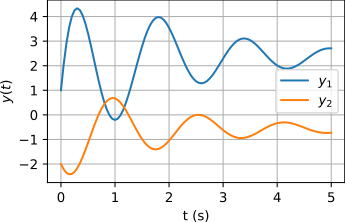
The output response is shown in figure 7.9.
The SymPy Package
The sympy package provides
symbolic math in Python. It supports matrix algebra, calculus, and
symbolic manipulation, which makes it well suited for deriving
closed-form expressions such as the state transition matrix \(\Phi(t)=e^{At}\), verifying analytic steps,
and simplifying results before plotting or numeric evaluation.
For design work, symbolic expressions are especially valuable because they expose the structure of the solution. A closed-form response shows how poles, zeros, and parameters enter into \(\bm{x}(t)\) or \(\bm{y}(t)\), which helps guide design decisions that affect stability, damping, and transient behavior. With symbolic results, it is often possible to reason about how changing a gain or parameter shifts a response without running a full numerical sweep.
Symbolic tools also make sensitivity analysis and optimization more transparent. Expressions can be differentiated analytically to reveal which parameters dominate a given performance metric. This can shorten the design loop by identifying good parameter directions before moving to numeric simulation.
Key functions we will use include (we will import sympy as sp):
sp.Matrix(data)for creating symbolic matricessp.symbols(names, **assumptions)for declaring symbolic variablessp.exp(expr)for matrix exponentials and elementwise exponentialssp.diff(expr, var)for analytic differentiationsp.simplify(expr)for algebraic simplificationsp.lambdify(args, expr, modules=None)for numeric evaluation
Example 2: Symbolic second-order system with a parameter
Consider a second-order mass-spring-damper system with mass \(m\), stiffness \(k\), and damping \(c\). For mass position \(x\) and state vector \[\bm{x} = \begin{bmatrix} x \\ \dot{x} \end{bmatrix},\] the state-space model is given by \[\dot{\bm{x}} = A \bm{x},\quad A = \begin{bmatrix} 0 & 1 \\ -k/m & -c/m \end{bmatrix},\quad \bm{x}(0)=\begin{bmatrix} 1 \\ 0 \end{bmatrix},\quad y = \begin{bmatrix} 1 & 0 \end{bmatrix} \bm{x}.\] Note that we have no inputs (i.e., no forcing). We would like to derive the free response \(y(t)\) as a function of the mass parameter \(m\) and then plot it for several values of \(m\).
We compute the analytic solution and then use sp.lambdify to evaluate it numerically
for several values of \(m\).
Import required libraries
import numpy as np
import sympy as sp
import matplotlib.pyplot as plt
Define symbolic variables: time t,
mass m, stiffness k, and damping c:
t = sp.symbols('t', nonnegative=True, real=True)
m, k, c = sp.symbols('m, k, c', positive=True, real=True)
Define the system matrices for a second-order system with initial condition:
A = sp.Matrix([[0, 1],
               [-k/m, -c/m]])
C = sp.Matrix([[1, 0]])
x0 = sp.Matrix([1, 0])
Compute the state transition matrix \(\Phi(t) = e^{At}\) and the output response:
Phi = sp.exp(A*t)
y = C * Phi * x0
Use sp.lambdify() to convert the
symbolic expression to a numerically evaluable function:
mods = [{'sqrt':np.emath.sqrt}, "scipy"]  # Complex sqrt handling
y_num = sp.lambdify((t, m), y[0].subs({k: 100, c: 5}), modules=mods)
Plot the output response for a few values of the mass parameter m:
t_vals = np.linspace(0, 4, 201)
m_vals = [0.5, 1.0, 2.0]

fig, ax = plt.subplots()
for m_val in m_vals:
    ax.plot(t_vals, y_num(t_vals, m_val), label=rf"$m={m_val}$")
ax.set_xlabel("t (s)")
ax.set_ylabel(r"$y(t)$")
ax.legend()
ax.grid(True)
plt.show()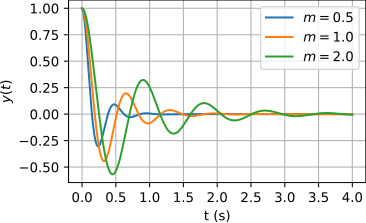
The output response for different mass values is shown in figure 7.10. Note how increasing mass slows the response and leads to more oscillation.
Matlab Tools
Matlab has several built-in and Control Systems Toolbox functions for analyzing state-space system models, especially linear models. We’ll explore a few, here.
Consider, for instance, a linear state model with the following \(A\), \(B\), \(C\), and \(D\) matrices: $$\begin{align} A &=\begin{bmatrix} -3 & 4 & 5 \\ 0 & -2 & 3 \\ 0 & -6 & 1 \end{bmatrix} \quad B &=\begin{bmatrix} 1 \\ 0 \\ 1 \end{bmatrix} \quad C &=\begin{bmatrix} 1 & 0 & 0 \\ 0 & -1 & 0 \end{bmatrix} \quad D &=\begin{bmatrix} 0 \\ 0 \end{bmatrix}. \end{align}$$
A = [-3,4,5;0,-2,3;0,-6,1];
B = [1;0;1];
C = [1,0,0;0,-1,0];
D = [0;0];
For a step input \(u(t) = 3 u_s(t)\) and initial state \(\bm{x}(0) = \begin{bmatrix} 1 & 2 & 3 \end{bmatrix}^\top\), let’s compare analytic and numerical solutions for the output response \(\bm{y}(t)\).
u = @(t) 3*ones(size(t)); % for t>=0
x_0 = [1; 2; 3];
Analytic Solution
For an analytic solution, we’ll use a rearranged version of .1
$$\begin{align} \bm{y}(t) &= C \Phi(t) \bm{x}(0) + C \Phi(t) \int_0^t \Phi(-\tau) B \bm{u}(\tau) d\tau + D \bm{u}(t). \label{eq:state-output-solution-remix} \end{align}$$
First, we need the state transition matrix \(\Phi(t)\), so we consider the eigenproblem.
[M,L] = eig(A)M =
1.0000 + 0.0000i 0.7522 + 0.0000i 0.7522 + 0.0000i
0.0000 + 0.0000i 0.3717 + 0.0810i 0.3717 - 0.0810i
0.0000 + 0.0000i 0.0787 + 0.5322i 0.0787 - 0.5322i
L =
-3.0000 + 0.0000i 0.0000 + 0.0000i 0.0000 + 0.0000i
0.0000 + 0.0000i -0.5000 + 3.9686i 0.0000 + 0.0000i
0.0000 + 0.0000i 0.0000 + 0.0000i -0.5000 - 3.9686iNote that, when assigning its output to two variables M and L, the eig function returns the modal matrix to
M and the eigenvalue matrix to
L. The modal matrix of eigenvectors
M has each column (eigenvector)
normalized to unity. Also notice that M and L are complex. The imaginary
parts of two eigenvalues and their corresponding eigenvectors are
significant. Finally, since the real parts of the all
eigenvalues are negative, the system is stable.
The “diagonal”-basis state transition matrix \(\Phi'(t)\) is simply
\[\begin{aligned} \Phi'(t) = e^{\Lambda t}. \end{aligned}\]
Let’s define this as an “anonymous” function.
Phi_p = @(t) diag(diag(exp(L*t))); % diags to get diagonal matThe original-basis state transition matrix \(\Phi(t)\) is, from ,
\[\begin{aligned} \Phi(t) = M \Phi'(t) M^{-1}. \end{aligned}\]
M_inv = M^-1; % compute just once, not on every call
Phi = @(t) M*Phi_p(t)*M_inv;
Free response
The free response is relatively straightforward to compute.
t_a = 0:.05:5; % simulation time
y_fr = NaN*ones(size(C,1),length(t_a)); % initialize
for i = 1:length(t_a)
    y_fr(:,i) = C*Phi(t_a(i))*x_0;
end
y_fr(:,1:3) % first three columns
ans =
1.0000 - 0.0000i 1.8922 - 0.0000i 2.5646 - 0.0000i
-2.0000 + 0.0000i -2.2030 + 0.0000i -2.3105 + 0.0000iA time array t_a was defined
such that Phi could be evaluated.
The first three columns of \(\bm{y}_\text{fr}\) are printed for the
first three moments in time. Note how there’s a “hanging chad” of
imaginary components. Before we realize them, let’s make sure they’re
negligibly tiny.
max(max(abs(imag(y_fr))))
y_fr = real(y_fr);
ans =
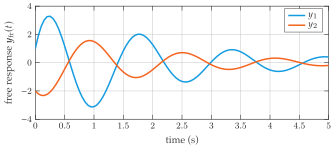
5.2907e-16The results are plotted in figure 7.11. As we might expect from the eigenvalues, the free responses of both outputs oscillate and decay.
Forced response
Now, there is the matter of integration in . Since Matlab does not excel
in symbolic manipulation, we have chosen to avoid attempting to write
the solution, symbolically. For this reason, we choose a simple
numerical (trapezoidal) approximation of the integral using the trapz function.
First, the integrand can be evaluated over the simulation interval.
integrand_a = NaN*ones(size(C,2),length(t_a)); % initialize
for i = 1:length(t_a)
    tau = t_a(i);
    integrand_a(:,i) = Phi(-tau)*B*u(tau);
end
Now, numerically integrate.
integral_a = zeros(size(integrand_a));
for i = 2:length(t_a)
    i_up = i; % upper limit of integration
    integral_a(:,i) = ... % transposes for trapz
        trapz(t_a(1:i_up)',integrand_a(:,1:i_up)')';
end
Now, evaluate the forced response at each time.
y_fo = NaN*ones(size(C,1),length(t_a)); % initialize
for i = 1:length(t_a)
    y_fo(:,i) = C*Phi(t_a(i))*integral_a(:,i);
end
y_fo(:,1:3) % first three columns
ans =
0.0000 + 0.0000i 0.1583 - 0.0000i 0.3342 - 0.0000i
0.0000 + 0.0000i -0.0109 + 0.0000i -0.0426 + 0.0000imax(max(abs(imag(y_fo))))
y_fo = real(y_fo);ans =
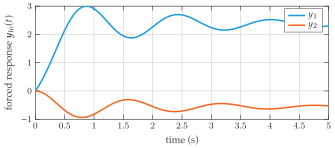
2.1409e-16The forced response is shown in figure 7.12, which shows damped oscillations.
Total response
The total response is found from the sum of the free and forced responses: \(\bm{y}(t) = \bm{y}_\text{fr} + \bm{y}_\text{fo}\). We can simply sum the arrays.
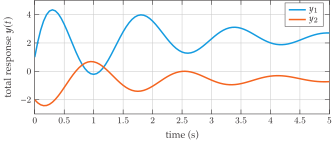
y_t = y_fr + y_fo;The result is plotted in figure 7.13.
Numerical solution
The numerical solution of the state equations is rather simple using
Matlab’s ss and step or lsim commands, as we show, here. First,
we define an ss model object—a
special kind of object that encodes a state-space model.
sys = ss(A,B,C,D);At this point, using the step
function would be the easiest way to solve for the step response.
However, we choose the more-general lsim for demonstration purposes.
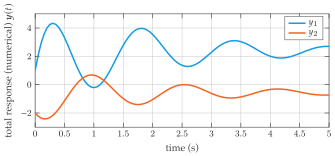
y_t_num = lsim(sys,u(t_a),t_a,x_0);This total solution is shown in figure 7.14.
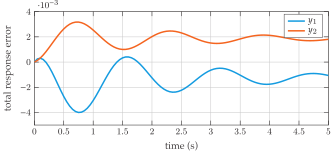
lsimd_y = y_t-y_t_num';Figure 7.15 shows a plot of the differences between the
analytic total solution y_t and the
numerical y_t_num for each output.
Note that calling this “error” is a bit presumptuous, given that we used
numerical integration in the analytic solution. If a more accurate
method is desired, working out the solution, symbolically, is the
best.
y_t-y_t_numAlthough we call this the “analytic” solution, we are not solving for a detailed symbolic expression, although we could. In fact, is the analytic solution and what follows is an attempt to represent it graphically.↩︎
Online Resources for Section 7.7
No online resources.