Nonlinear Systems in Python
Most of the Python Control Systems package tools we’ve used will not work for nonlinear systems. For instance, nonlinear systems cannot be defined with
control.tf(),control.ss(), andcontrol.zpk().
Similarly, the simulation functions
control.forced_response(),control.initial_response(), andcontrol.step_response()
do not work for nonlinear systems.
There are two common ways of defining and simulating nonlinear
systems in Python. The first uses the SciPy package’s integrate module’s functions such as
solve_ivp(). The second uses the
Control Systems package, which has nonlinear state-space model
reprsentations. For simulating nonlinear systems, the Control Systems
package actually calls the SciPy package’s integrate module’s functions. Because
we have already been using the Control Systems package for linear system
models, we will us its nonlinear facilities, as well. However, it should
be mentioned that the package’s documentation for nonlinear systems is a
bit sparse.
Defining a Nonlinear System
We can define a nonlinear system in the Control Systems package by
calling the control.nlsys()
function. Here are its most important arguments, for us:
updfcn(callable): The state update function that encodes the right-hand side of the state equation (i.e., \(\bm{f}(\bm{x}, \bm{u}, t)\)). It should have the formupdfcn(t, x, u, params) -> array, wheretis the current value of time,xis a 1D NumPy array representing the states,uis a 1D array representing the inputs, andparamsis adictof parameter values. The function should return an array of state derivatives (i.e., \(\bm{x}'\)).outfcn(callable, optional): The output function that encodes the right-hand side of the output equation (i.e., \(\bm{g}(\bm{x}, \bm{u}, t)\)). It should have the formoutfcn(t, x, u, params) -> array, wheret,x,u, andparamsare as they were forupdfcn. If this argument is not provided, the output is taken to be the states (i.e., \(\bm{y} = \bm{x}\)).inputs(int,listofstrorNone, optional): System inputs description. The number of inputs is given by anint. A name for each can be given as alistofstrs. If it is not provided or ifNoneis passed, the function will attempt to discern the inputs.outputs(int,listofstrorNone, optional): System outputs description, with the same options asinputs.states(int,listofstrorNone, optional): System states description, with the same options asinputs.params(dict, optional): Numerical values of parameters for evaluation in functions.
Consider the Van der Pol oscillator nonlinear state-space model $$\begin{align} \dot{\bm{x}} &= f(\bm{x}) \nonumber \\ &= \begin{bmatrix} x_2 \\ (1-x_1^2) x_2 - x_1 \end{bmatrix}. \end{align}$$ Note that this is an autonomous system (i.e., there are no inputs). This state equation has applications in electrical and biological modeling. We can encode its dynamics in the following Python update function:
def van_der_pol_update(t, x, u, params):
    """Returns the rhs of the Van der Pol state equation"""
    dxdt = np.array([x[1], (1 - x[0]**2) * x[1] - x[0]])
    return dxdt
Now we can create a nonlinear system model with control.nlsys() as follows:
sys = control.nlsys(van_der_pol_update, inputs=0, states=2, outputs=2)This creates a NonlinearIOSystem object.
Simulating a Nonlinear System
A nonlinear system in the form of a NonlinearIOSystem object can be
simulated (i.e., numerically solved) with the control.input_output_response()
function. This function is very similar to control.forced_response(), so we will
immediately apply it to our Van der Pol oscillator model as follows:
T = np.linspace(0, 25, 301)  # Simulation time array
y = control.input_output_response(
    sys, T=T, X0=[3, 0], squeeze=True
).outputs
This returns a TimeResponseData object, just as does
control.forced_response(), so we
have selected the outputs data
attribute.
Plotting the Step Response
We can plot the response through time as follows:
fig, ax = plt.subplots()
ax.plot(T, y[0,:], label="$x_1(t)$")
ax.plot(T, y[1,:], label="$x_2(t)$")
ax.set_xlabel("Time (s)")
ax.set_ylabel("State Response")
ax.legend(loc='upper right')
plt.show()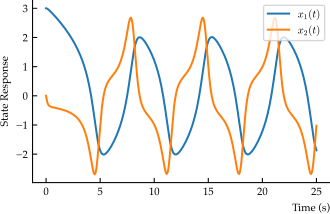
fig, ax = plt.subplots()
ax.plot(y[0,:], y[1,:])
ax.set_xlabel("$x_1(t)$")
ax.set_ylabel("$x_2(t)$")
plt.show()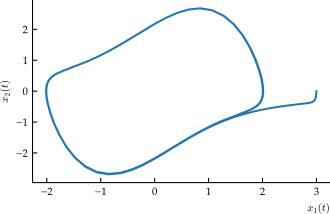
Online Resources for Section 14.3
No online resources.